CSS Selectors 101: Targeting Elements with Precision

Why CSS selectors are needed?
Imagine you have a hundred elements on a page. CSS needs to know which one to style. You can't just say "make it red" — red what? Selectors are CSS's way of pointing at the exact element it wants to change. No selector, no styling. That's it.
Element selector?
The simplest one. You just type the tag name — like
porh1. It selects every single element with that tag on the page. Easy to use, but it's a big net — it catches everything.HTML
 <h1>Title</h1>
 <p>First paragraph</p>
 <p>Second paragraph</p>
CSS
 p {
   color: red;
 }
 /* both <p> tags turn red */
Class selector?
Classes let you pick specific elements, not all of them. You give an element a class name in HTML, then target it with a
.dot in CSS. You can reuse the same class on multiple elements — that's the superpower. Think of it like a nickname you can hand out to anyone.HTML
 <p>Normal text</p>
 <p class="highlight">
   This one is special
 </p>
 <p>Also normal</p>
CSS
 .highlight {
   color: blue;
   font-weight: bold;
 }
 /* only the one with class */
ID selector:
IDs are like unique names — only one element can have it on the whole page. You mark it with
id="name"in HTML, then target it with a#hash in CSS. Use it when you need to style one specific, one-of-a-kind element.HTML
 <h1>Header</h1>
 <p>Some text</p>
 <p id="main-intro">
   The intro paragraph
 </p>
CSS
 #main-intro {
   font-size: 1.2rem;
   color: green;
 }
 /* only that one <p> */
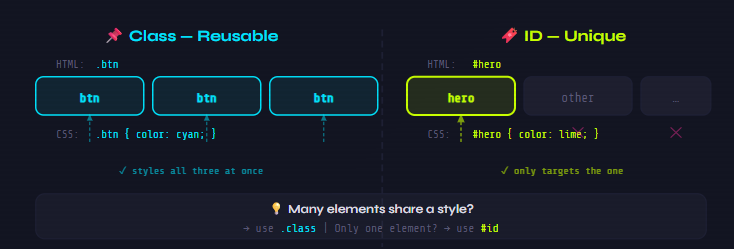
Class vs ID — When to Use Which?
Simple rule: use .class when multiple elements share the same style. Use #id when it's a one-time, unique element. Classes are reusable. IDs are singular. That's the deciding factor.
Group & Descendant Selectors?
Group selectors let you style multiple elements with the same rules just separate them with a
,comma. No need to repeat yourself. Descendant selectors use a space to target elements inside other elements. Like saying "only theptags that live inside adiv."
Group Selectorh1, h2, h3 { color: navy; margin-bottom: 10px; } /* styles all three at once */Descendant Selector
 div p {
   color: gray;
 }
 /* only <p> inside <div> */
 /* other <p> stay untouched */
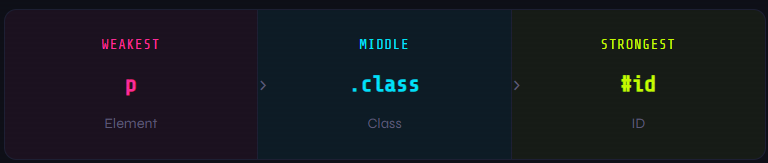
Basic selector priority (very high level)
When two selectors target the same element, which one wins? There's a simple pecking order. IDs are the strongest, classes are mid, and element selectors are the weakest. The more specific your selector, the louder it shouts.
Summary:
A beginner-friendly breakdown of CSS selectors how CSS actually picks which elements to style. Covers element, class, and ID selectors in order from broadest to most specific, with HTML + CSS code examples side by side for each. Includes a visual diagram comparing class vs ID usage, explains group and descendant selectors, and wraps up with a simple priority bar showing which selector wins when they clash.